
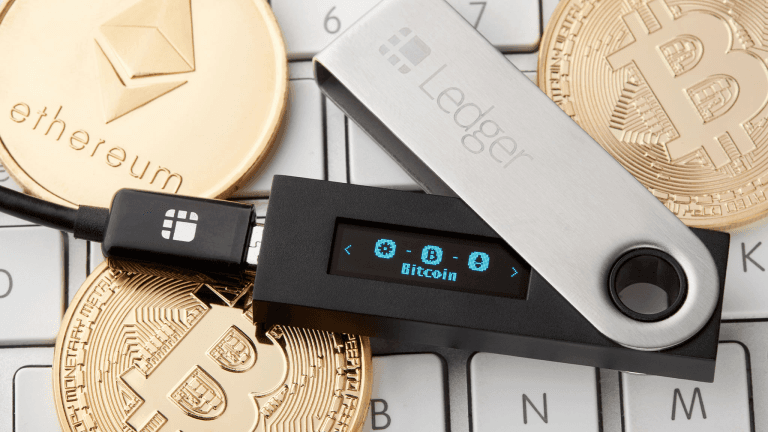
In the world of decentralized finance, one truth remains absolute: if you don't hold the keys, you don't own the crypto. Amid constant exchange hacks, sophisticated phishing scams, and the devastating risk of losing assets to malware, relying on an internet-connected wallet has become the single biggest threat to your digital wealth.
This comprehensive guide serves as your definitive roadmap to achieving true digital sovereignty, focusing on the core concept of the Crypto Ledger. We will demystify the underlying Distributed Ledger Technology (DLT) and provide an expert breakdown of the gold standard for cold storage—the Ledger hardware wallet—detailing how its Secure Element chip protects your private keys and why switching to self-custody is the most important financial decision you can make in the digital age.
The Crypto Ledger: More Than Just a Storage Device
The term "crypto ledger" often carries a dual meaning in the world of digital assets. While it is now most commonly associated with the popular brand of hardware wallets (like the Ledger Nano series), its root lies in the foundational technology that makes cryptocurrency possible: the Distributed Ledger Technology (DLT), or the blockchain itself. For investors and enthusiasts, it is crucial to understand both concepts to ensure genuine security and true ownership of their digital wealth.
1.1. The Foundational Ledger: Distributed Ledger Technology (DLT)
At its core, a crypto ledger is a public, shared, and constantly synchronized database of all transactions that have ever occurred on a specific cryptocurrency network (like Bitcoin or Ethereum). Every transaction is recorded in cryptographic blocks, which are chained together chronologically. Once a block is verified and added, it cannot be altered or deleted, making the ledger immutable and fully auditable by anyone. This ledger is decentralized, meaning it is not controlled by any single bank or entity, but copied and maintained across thousands of computers (nodes) globally. This shared, tamper-proof record is the backbone of all digital assets.
1.2. The Personal Ledger: Your Key to Digital Sovereignty
If the blockchain is the public record of ownership, the device or application you use is your personal key to accessing and interacting with that record. This leads to the critical question: What is a crypto wallet and how does it work? A crypto wallet doesn't technically "hold" your crypto. Instead, it holds your private keys. These private keys are the cryptographic proof of ownership that allows you to authorize—or "sign"—a transaction on the public crypto ledger. Your crypto always remains on the public ledger; the wallet is simply the tool you use to control it.
The most important distinction in wallets is between hot and cold storage.
Hot Wallets vs. Cold Wallets
A hot wallet is connected to the internet (e.g., mobile apps, exchange accounts), making it convenient but vulnerable to online threats like malware and phishing. Conversely, a cold wallet (like a Ledger hardware device) is kept offline.
One of the most essential concepts for every crypto user is the difference between an online, internet-connected wallet, and an offline solution.
1.3. A Modern Necessity: Securing Your Assets Offline
The necessity of cold storage leads to the next crucial question: What is the difference between a hot wallet and a cold wallet? The difference lies purely in the security of the private keys.
Hot Wallet: Private keys are stored on an internet-connected device or server, exposing them to online risks. They are best for small amounts and frequent transactions.
Cold Wallet (Hardware Wallet): Private keys are stored exclusively on an offline, physical device. This offline isolation eliminates the risk of online theft, malware, and remote attacks, making the device the safest option for long-term holding of large amounts—a concept championed by the Ledger brand of hardware wallets.
By using a hardware wallet, you effectively make yourself your own bank, gaining full, sovereign control over your digital wealth, an essential practice in the evolving digital economy.
The Security Imperative: Understanding Self-Custody and Risk Elimination
The core motivation behind using a hardware wallet is achieving self-custody—taking complete, verifiable control over your assets. The moment you move your crypto off an exchange or out of a software wallet and onto a device like a Ledger, you eliminate the single greatest risk in crypto: counterparty risk (the risk that a third party will be hacked or misuse your funds). This level of security is achieved through the isolation of your private keys and specialized hardware.
2.1. The Role of the Private Key: Isolation is Protection
The key principle of cold storage is key isolation. A private key is the cryptographic string that authorizes spending your coins on the public ledger. If this key is ever exposed to an internet-connected computer, it is vulnerable to various online attacks.
You can secure crypto offline by transferring your assets into a hardware wallet—such as a Ledger device—so your private keys never touch an internet-connected device, effectively eliminating risks from malware, phishing, and exchange hacks.
This naturally leads to the question: How does a hardware wallet prevent hacking?
A hardware wallet prevents hacking because the private key never leaves the physical device to sign a transaction. When you initiate a transfer, the transaction details (address, amount) are sent to the Ledger. The signing process happens internally within the device's isolated environment. Only the signed (authorized) transaction is then sent back to your computer to be broadcast to the blockchain. Since the private key remains offline, it is impervious to online theft, malware, and remote intrusion.
2.2. Secure Element Technology: The Bank-Grade Fortress
Ledger devices rely on a specialized security chip known as the Secure Element (SE) certified under Common Criteria (CC EAL5+ or EAL6+), plus in some cases CSPN certification — both of which are widely accepted “industrial-grade” security standards. SE is a technology rated for high-security applications like passports and credit cards. This SE chip is physically isolated and tamper-resistant, meaning any attempt to extract the private keys through sophisticated physical or side-channel analysis will typically result in the keys being destroyed. This cryptographic fortress ensures your keys remain secrets, even if the device is plugged into a compromised computer.
2.3. The Ultimate Backup: The Secret Recovery Phrase (Seed)
While the Ledger device itself provides daily protection, the ultimate safeguard against loss or damage is the Secret Recovery Phrase (often called the seed phrase or backup phrase)—a sequence of 12, 18, or most commonly, 24 random words.
This raises three crucial security questions. First: What is a 24-word recovery phrase (Secret Recovery Phrase)?
The 24-word recovery phrase is your master key. It is generated by the device upon initial setup and is the single backup needed to restore access to all your cryptocurrency funds, across all coins and all accounts, onto any compatible hardware wallet. It is your only defense if your physical Ledger device is lost, stolen, or broken.
Second: Can my crypto be stolen if I lose my Ledger device?
No, your crypto cannot be stolen if you lose the physical device, provided your 24-word recovery phrase is secured offline. A thief would still need your device's PIN, and since the keys cannot be extracted from the Secure Element chip, your funds are safe. You would simply use your recovery phrase to restore your accounts onto a new Ledger (or another compatible wallet). However, it is a critical mandate that the recovery phrase never be digitized (typed into a computer, photographed, or stored in cloud storage), as obtaining this phrase grants a thief immediate and irrevocable access to all your funds.
Third: Is Ledger safe for Beginner?
Yes, Ledger is safe for beginners because it uses a Secure Element chip with Common Criteria (CC EAL5+) certification, keeps your private keys completely offline, and provides step-by-step setup through the Ledger Live app.
Finding Your Perfect Crypto Ledger
The security core of all modern Ledger devices is identical—they all use a certified Secure Element (SE) chip to protect your private keys. The primary differences between the current popular models boil down to convenience, capacity, and connectivity, allowing you to choose the Ledger that fits your lifestyle.
The best cold wallet for long-term holding is one that keeps private keys fully offline, uses certified Secure Element hardware such as the Ledger Nano series, and provides reliable recovery options through a securely stored 24-word seed phrase.
Core Product Comparison: Nano X vs. Nano S Plus
The most common comparison users search for is: What is the difference between Ledger Nano X and Nano S Plus?
In short, if you prioritize wireless mobility (especially with an iPhone/iOS device), the Nano X justifies its higher price. If you mainly use a desktop or an Android phone with a USB cable, the Nano S Plus offers the same core security at half the cost.
3.1. The Ledger Live Ecosystem: Your Secure Gateway
The hardware device is useless without the accompanying software. Ledger Live is the all-in-one application (available on desktop and mobile) that acts as your secure portal to the crypto ecosystem, simplifying management while keeping your keys offline.
Ledger Live allows you to:
View Balances: Track your entire portfolio across all your different crypto accounts in real-time.
Install Apps: Manage the specific blockchain apps (e.g., Bitcoin, Ethereum, Solana) needed on your physical device.
Transact: Safely Send and Receive crypto, Buy, Swap, and Stake through integrated third-party partners.
3.2. Step-by-Step Guide: How to Use Your Ledger Wallet
Setting up and transacting with your Ledger device involves a secure two-step process that utilizes both the physical device and the Ledger Live app.
How to Set Up Your Device (Initial Setup)
Download: Download and install the official Ledger Live application from the official website.
Initialize: Connect your device and follow the on-screen prompts to set a PIN code (3 to 8 digits).
Record: Write down your 24-word Secret Recovery Phrase (generated on the device screen) on the provided paper sheets. This step is the most critical and must be done offline.
Verify: The device will then ask you to re-enter a few words to confirm you have recorded the phrase correctly.
How to Send and Receive Crypto (Daily Use)
Once set up, the process for managing assets is straightforward:
3.3. Growing Your Portfolio Securely
A common advanced use case is earning passive income, leading to the question: Can I stake crypto on a Ledger?
The answer is Yes. Ledger Live supports staking for major Proof-of-Stake (PoS) cryptocurrencies (like Ethereum, Solana, Polkadot, etc.) directly within the application's 'Earn' section.
Security Advantage: When you stake using Ledger Live, your private keys remain offline and secured by your physical device. Unlike staking on a centralized exchange, you maintain complete, self-custodial control over your assets at all times, making it the safest way to earn rewards on your holdings.
Connecting Your Ledger to Web3 and DeFi
While Ledger Live is the secure dashboard for managing your portfolio, the true power of a hardware wallet is its ability to interact safely with the broader world of decentralized finance (DeFi) and Web3 applications. By using your Ledger, you can participate in complex activities—like interacting with decentralized exchanges (DEXs), liquidity protocols, and NFT marketplaces—without ever exposing your private keys.
Advanced Use Case: MetaMask and Ledger Integration
For many users, accessing the Ethereum-based DeFi ecosystem requires MetaMask. Instead of relying on MetaMask's less secure software key management, you can seamlessly connect your Ledger device.
How to connect your Ledger to MetaMask securely:
Open the Ledger Live application and ensure the appropriate blockchain app (e.g., Ethereum) is installed on your physical Ledger device.
In the MetaMask browser extension, select "Connect Hardware Wallet" and choose "Ledger."
MetaMask prompts the Ledger device to sign a connection request.
Once connected, your Ledger-protected accounts appear in MetaMask. Crucially, every transaction you attempt through MetaMask will require a physical, manual confirmation on your Ledger device's screen.
This integration means you can interact with dApps while your private keys remain secured by the Secure Element chip, merging convenience with maximum security.
4.1. Troubleshooting and Recovery Procedures (High-Intent PAA)
Even the most robust security systems require a plan for contingencies. Users frequently search for solutions to common issues related to PINs, lost devices, and transfers.
What happens if I forget my PIN?
The PIN is a local security measure that protects the device from unauthorized physical access. If you forget your PIN, the device will lock you out after three failed attempts. This leads to the next step:
Safety Feature: The Ledger will automatically wipe itself clean after the third failed PIN attempt. Your crypto is still safe because your private keys were never stored on the physical device in the first place, only the Secure Element's encrypted data.
Recovery: You must use your 24-word Secret Recovery Phrase to restore your accounts onto the wiped device or a new replacement device.
How do I transfer crypto from an exchange to my Ledger?
Transferring assets from a centralized exchange to a cold wallet is often the first step in achieving self-custody.
Generate Address: Open your Ledger Live application, select the account (e.g., Bitcoin), and click "Receive." Follow the prompt to verify the address on your physical Ledger screen.
Copy and Paste: Copy this verified address from Ledger Live.
Initiate Withdrawal: Log into your exchange account, navigate to the withdrawal section, and paste the verified address as the destination.
Confirm and Send: The exchange processes the withdrawal, sending the funds to the address controlled by your offline Ledger keys.
4.2. Final Security Checklist
As a final point of authority, always adhere to this quick checklist to maintain optimal security:
Source: Only purchase Ledger devices directly from the official Ledger website or authorized retailers.
Initialization: Always generate your PIN and Recovery Phrase on the device itself—never use a pre-written phrase or one provided in the box.
Updates: Keep the Ledger Live application and the firmware on your device updated to ensure you have the latest security patches.
This comprehensive article has covered the definition of the crypto ledger, the necessity of cold storage, the comparison between top models, secure usage via Ledger Live, and advanced troubleshooting and focused on security best practices and does not endorse, guarantee the performance of, or assume liability for the services or offerings provided by Kommunitas.net. It helps to understand what a crypto wallet actually is.